
The short version
Short answer: a headless CMS is a content management system that manages content without dictating how it is displayed. You manage copy and images in one central place and publish them through an API to your website, app, or another channel. Below, you'll read how that works, what it offers, and when a headless CMS is not the right choice.
A headless CMS is a content management system without a fixed frontend. You manage copy and images in one place, and a separate website or app fetches that content through an API. You decide how and where the content appears. At Straffe Sites, I often build business websites this way, with Storyblok as the CMS. Below, you’ll read how it works, what it offers and where the drawbacks are.
What is a headless CMS?
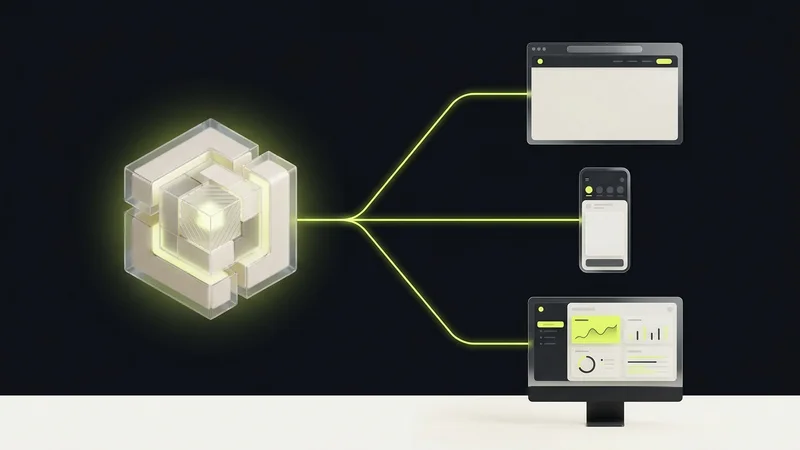
A headless CMS is a content management system that is separate from your website (the frontend). It manages and stores content such as text and images, but does not decide how that content appears on a website or in an app. This differs from a traditional CMS such as WordPress, which manages both the backend and the frontend. You’ll also hear the term decoupled CMS for this.
With a headless CMS, you manage content in one central place and send it through APIs to different channels, including websites and apps. Each channel can present the same content in its own way.
How does a headless CMS work?
In practice, it works in five steps:
- Content model: the developer defines which types of content exist, such as a page, a blog post or a product card, and which fields each type has.
- Editing: editors fill in those fields in the CMS. Roles and permissions decide who can edit and who can publish.
- API: the CMS makes the published content available as structured data.
- Frontend: the website or app fetches that data and decides how it looks. That can happen on every visit or once while the site is built.
- Publishing: on a static site, publishing starts a new build. The pages then reach the visitor as ready-made files through a content delivery network (CDN).
Web frameworks are built around exactly that split. The Astro documentation puts it like this:
This means that the CMS helps you write your content, but doesn’t generate a site that displays it. Instead, you fetch the content data and use in your Astro project.
So the CMS writes and the frontend shows. The Astro guide to CMSs lists dozens of systems that work with an Astro site this way, Storyblok included.
What are the benefits of a headless CMS?
A headless CMS gives you freedom in the frontend, lets the same content go to several channels and keeps editing separate from the website. In practice:
- More room for speed: because the CMS and the website are separate, you can serve the website as static files through a CDN. Separation alone does not make a site faster; the frontend decides the load time.
- Less CMS maintenance: with a SaaS CMS, the provider handles updates and security for the backend. If you host the CMS yourself, that stays your job.
- Focused development: developers build the website with the framework that fits the project, without working around the themes or plugins of a CMS.
- Flexibility: the same content can go to a website, an app or another platform. Each one shows it in its own design.
- Easier expansion: a new channel fetches the same content through the API, so nobody has to enter everything again.
What are the drawbacks of a headless CMS?
Headless is not the default choice. You get a separate frontend that someone has to build, host and maintain. Features a classic CMS ships with, such as a theme or a page preview, have to be connected between the CMS and the frontend by a developer.
For a simple site with a handful of pages that works well with a standard theme, a classic CMS such as WordPress is often faster to set up. Look beyond the license when you compare costs. Next to the subscription for a SaaS CMS, you pay for building the frontend and for hosting. With an open-source CMS you host yourself, such as Strapi, the license disappears, but server management and updates become your job.
Not sure whether headless fits your project? Read the decision guide building a headless website: when it pays off first.
Storyblok, a headless CMS with a visual editor
I mostly work with Storyblok myself. Other well-known headless systems include Contentful, Sanity and Strapi. Storyblok stands out mainly for its visual editor: editors see the page while they build it.
At Straffe Sites, I prepare the building blocks in Storyblok, such as a hero, a text block, an FAQ or a row of cards. The client uses them to put pages together without writing code. We agree in advance on what each block can contain, so a new page keeps the same style as the rest of the site. The Storyblok service page shows how we set that up for clients.
Our own measurements show that such a setup can be fast. We measure the websites in our cases every month with PageSpeed Insights. In September 2026, the nine sites that run on Storyblok reached a best mobile Performance score between 94 and 100; five of the nine scored 100. Those scores come mainly from the static frontend we build on top, not from Storyblok alone.
When should you choose a headless CMS?
A headless CMS pays off when you want to use content in several places or when speed and a custom frontend matter a lot. It also helps when an editorial team needs to work safely without touching the code. For a small site that works well with a standard theme, it is often a detour.
As a Storyblok partner, I’m happy to help with that choice and with the build. Want help selecting, structuring and connecting a CMS? See headless CMS implementation. Want a complete website built around that architecture? See having a headless website built. Already chose Storyblok? The migration guide to Storyblok covers the move per source. And with a small technical team, you can sometimes drop the CMS altogether: a website without a CMS shows how this site does it.
Not sure yet whether your project needs a headless CMS? Get in touch and we’ll look at it together.